Gemini 3 Hackathon: Building Sequence, an AI powered Video Editor
Building Sequence, an AI-powered video editor at the Gemini 3 Hackathon.
Alright, so I just finished the Gemini 3 Hackathon and built something I'm actually pretty excited about. It was a short 8-hour hackathon, and honestly? I'm surprised we got as far as we did. Here's our GitHub repository if you want to check it out!
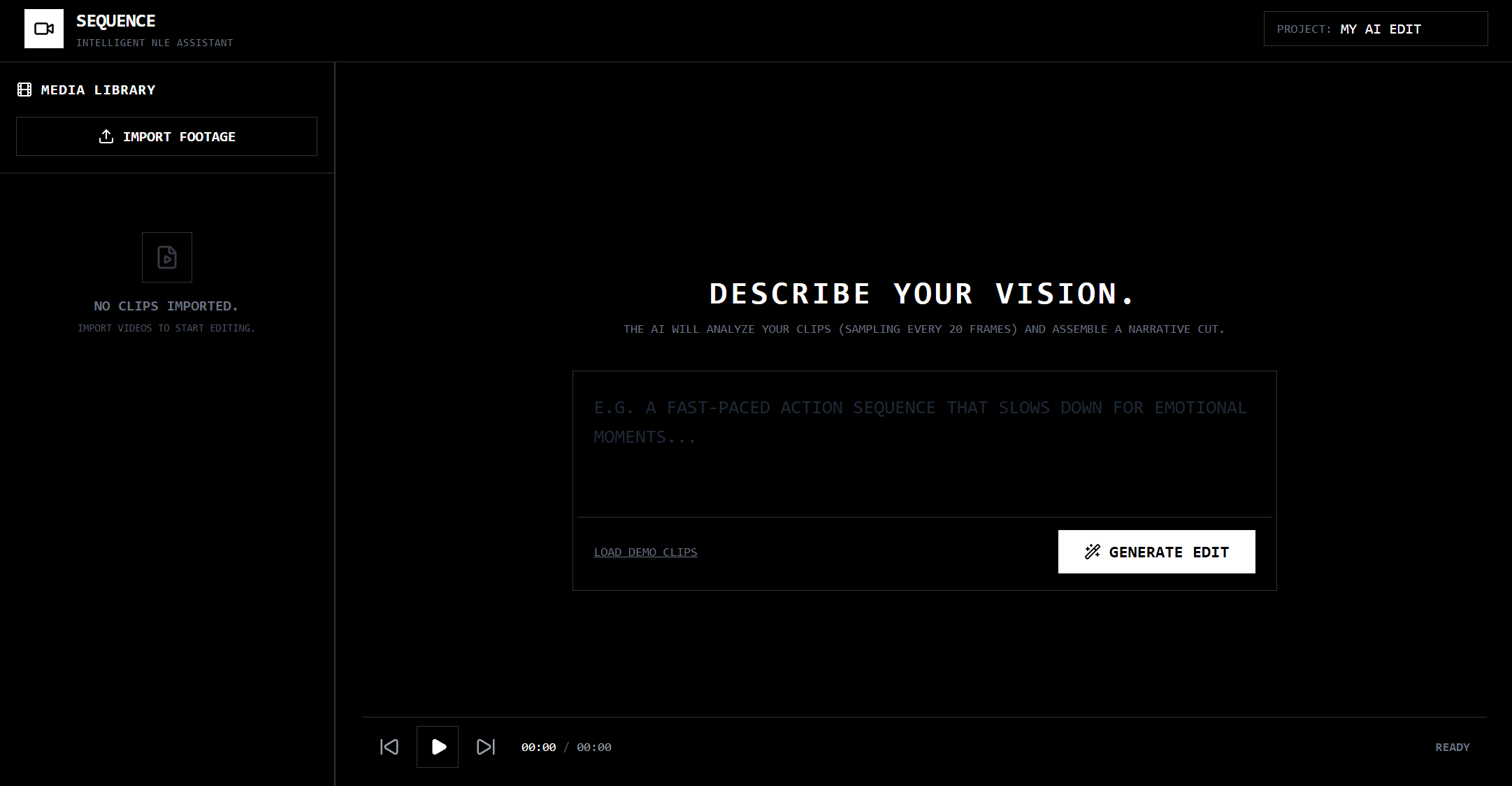
The Initial Idea: Cursor for Video Editing
The hackathon prompt was pretty open-ended - build something cool with Gemini 3. My initial idea was to build a "Cursor for video editing" - basically, an AI assistant that could help you edit videos by understanding your intent and automatically cutting, arranging, and sequencing clips based on natural language descriptions. This would help me immensely since I'm a video editor myself, and I often have SO MUCH footage that I'm reluctant to look through and edit...
Think about it: you upload a bunch of raw footage, describe what you want ("a fast-paced action sequence that slows down for emotional moments"), and the AI figures out which clips to use, where to cut them, and how to arrange them on a timeline. Pretty neat. Even better, my idea was to have a "ghost" edit show up in the timeline, and the user could "Tab" to accept the edit (like Cursor!). Unfortunately, we were not technically inclined to do this.
Trying to Fork Existing Editors (Spoiler: It Didn't Work)
At first, I thought the smart move would be to fork an existing open-source video editor and add AI capabilities on top. I looked at two options: Kdenlive and Shotcut. Both are solid, mature video editors with active communities.
The problem? They were both a pain to build and run.
Kdenlive is built on Qt and has a pretty complex build system. We spent way too long trying to get the dependencies right, dealing with CMake configuration issues, and honestly just getting lost in their codebase. Shotcut wasn't much better - it's also Qt-based and the build process was... let's just say it wasn't hackathon-friendly.
At this point, we were maybe 2 hours into the hackathon and had nothing working. Classic hackathon moment where you realize your "smart" shortcut was actually the longest path possible.
Building From Scratch
So we did what any reasonable person would do: build from scratch.
Look, I know it sounds insane for an 8-hour hackathon, but hear me out. Modern web tech is actually pretty good for this kind of thing. We could use:
- React for the UI (which I'm comfortable with)
- Canvas API for video playback and timeline visualization
- File API for handling video uploads
- Gemini API for the AI magic
The core workflow would be:
- User uploads video clips
- Extract frames from videos (every 20 frames for dense sampling)
- Send frames to Gemini Vision API for analysis
- User describes their desired edit theme
- Gemini generates edit decisions (which clips, where to cut, in/out points)
- Build a timeline and export to Final Cut Pro XML
Although the best way would be to edit straight in the editor, we couldn't figure out how to build an entire editor in 8 hours. XML is a file format that's accepted by most industry standard video editors, and captures information about the clips used, their duration, transitions, and effects. We decided that this was the best way to get it working in our limited time frame.
How We Built It
Video Processing
First, we needed to extract frames from uploaded videos. The browser's Canvas API makes this surprisingly straightforward:
export const extractFramesFromVideo = async (
  videoUrl: string,
  duration: number,
  frameInterval: number
): Promise<string[]> => {
  const video = document.createElement('video');
  video.src = videoUrl;
  video.crossOrigin = 'anonymous';

  await new Promise((resolve) => {
    video.onloadedmetadata = resolve;
  });

  const frames: string[] = [];
  const canvas = document.createElement('canvas');
  const ctx = canvas.getContext('2d')!;

  canvas.width = video.videoWidth;
  canvas.height = video.videoHeight;

  for (let time = 0; time < duration; time += frameInterval / 30) {
    video.currentTime = time;
    await new Promise((resolve) => {
      video.onseeked = resolve;
    });

    ctx.drawImage(video, 0, 0);
    frames.push(canvas.toDataURL('image/jpeg'));
  }

  return frames;
};
This extracts frames at regular intervals (every 20 frames ≈ 0.66 seconds at 30fps) and converts them to base64 data URLs that we can send to Gemini.
AI Analysis with Gemini
The cool part is using Gemini's vision capabilities to understand what's actually in each clip. We send the extracted frames along with a prompt asking Gemini to:
- Summarize the clip
- Identify mood and keywords
- Segment the video into distinct visual events with timestamps
const prompt = `
  You are an expert Video Logger and Metadata Specialist.

  CONTEXT:
  - You are viewing ${imagesData.length} extracted frames from a single video file.
  - Total Video Duration: ${Math.round(duration * 100) / 100} seconds.
  - The frames are spaced evenly chronologically from 0s to end.

  TASK:
  1. Create a general summary of the clip.
  2. Identify the mood (e.g. "tense", "joyful") and keywords (e.g. "outdoors", "car").
  3. SEGMENT the video: Break the video into distinct visual events or shots based on the frames.
     - accurately calculate start/end times for each segment based on the frame index.
     - Describe the action in that specific segment.
`;
Gemini returns structured JSON with summaries, moods, keywords, and timecoded segments. This gives us rich metadata about each clip that we can use for intelligent editing.
Edit Generation
Once we have analyzed all the clips, the user describes their desired edit theme. Then we send everything to Gemini 3 Flash Preview (which supports structured JSON output) to generate edit decisions:
const response = await ai.models.generateContent({
  model: 'gemini-3-flash-preview',
  contents: prompt,
  config: {
    systemInstruction: "You are an expert video editor. Be precise with timecodes.",
    responseMimeType: "application/json",
    responseSchema: {
      type: Type.OBJECT,
      properties: {
        storyline: { type: Type.STRING },
        edits: {
          type: Type.ARRAY,
          items: {
            type: Type.OBJECT,
            properties: {
              sourceId: { type: Type.STRING },
              inPoint: { type: Type.NUMBER },
              outPoint: { type: Type.NUMBER },
              reasoning: { type: Type.STRING }
            }
          }
        }
      }
    }
  }
});
The AI returns a list of edit decisions: which clips to use, precise in/out points, and reasoning for each choice. We then assemble these into a timeline.
Timeline & Export
The timeline component displays the generated edits visually, and we can preview the assembled video in real-time. For export, we generate Final Cut Pro 7 XML format - as said earlier, it's a standard that most video editors can import, so users can take the AI-generated edit and refine it in their preferred editor.
The XML generation was... interesting. FCP7 XML has a pretty specific structure with file references, timecodes, track linking, etc. But once we figured out the format, it was just a matter of templating it correctly.
The Pivot That Almost Happened
About halfway through the hackathon, I got distracted (classic). I started thinking about building Stickfreak - a tool to convert your pictures into memey stickers using Gemini's image generation capabilities.
I actually got pretty far with it - Google AI Studio was pretty goated and almost one-shot my idea. I had the image upload working, was playing around with prompts to generate sticker-style images... but then I realized my teammates were making real progress and I was spending time on a completely different project. So I pulled myself back and focused on finishing Sequence.
Honestly, Stickfreak might be a fun project for another day. But not during a hackathon when you're already 4 hours in lol.
Reflections
Gemini is Really Powerful
I was honestly impressed by how well Gemini handled the video analysis. The vision model (gemini-2.5-flash-image) could understand context across multiple frames, identify distinct visual events, and even estimate timestamps reasonably accurately. The structured JSON output from Gemini 3 Flash Preview made it super easy to integrate - no parsing markdown or dealing with inconsistent formats.
The fact that we could send 80+ frames in a single request and get back coherent, structured analysis was wild. The API was also pretty fast, which was crucial for a hackathon project.
Google AI Studio is Also Insane
I spent a lot of time in Google AI Studio just testing prompts and seeing what Gemini could do. The interface is clean, the response times are good, and it made iterating on prompts way easier than I expected. Being able to test vision prompts with actual images right in the browser saved me a ton of time.
Learning OpenCode and Claude
This was actually my first time using OpenCode (thanks to my teammate Joseph!) and working with Claude in a coding context. I gotta say - it's pretty wild how much faster you can build things when you have an AI pair programmer that actually understands your codebase.
I'd describe what I wanted, and Claude would generate the code. Then I'd tweak it, and it would understand the context. It felt like pair programming, but way faster. I'm not sure I could have built this in 8 hours without it.
That said, there were definitely moments where Claude would hallucinate API methods or suggest things that didn't quite work. But overall, it was a huge productivity boost.
What We Ended Up With
Sequence is a working AI-powered video editor that:
- Analyzes video clips using Gemini Vision
- Generates edit decisions based on natural language themes
- Displays a visual timeline
- Exports to Final Cut Pro XML
It's not perfect - the frame extraction could be optimized, the timeline UI is pretty basic, and longer videos take a while to process. But for an 8-hour hackathon project, I'm pretty happy with it.
The core idea works: you describe what you want, and the AI figures out how to edit your footage. That's pretty cool.
Overall, this was a fun project! I learned a lot about video processing, Gemini's capabilities, and how to build something ambitious in a short timeframe. The hackathon format forced me to focus on what actually mattered and ship something that works, even if it's not perfect.
Check out the repo and our demo video if you want to try it yourself!