This is the full technical report from my 12 weeks at Visa. For the shorter, more personal version, see Building a Retrieval-Augmented Investigation Assistant. You can also grab the original as a PDF.
Executive Summary
This report details my time as a Software Engineering Intern in Visa's VisaNet Integrated Payment (VIP) Coverage Team, under Operations and Infrastructure (O&I). Over the course of the internship, I focused on improving incident response for the VIP Coverage Team. This entailed learning about the fundamentals of VIP, and how payment transactions flow from the acquirer to the issuer.
Historical incident records were fragmented across operational diaries, incident reports, and email threads, making earlier resolutions difficult to reuse. My project, VIP-SAGE (Searchable Archive for Guided Escalation) cleans and consolidates these records, searches them using exact and meaning-based matching, and uses the retrieved evidence to support logprint analysis and initial diagnosis.
I designed and implemented VIP-SAGE (referred to as SAGE) as a Generative AI tool with retrieval-augmentation to connect log outputs and incident evidence to historical cases and grounded first-diagnosis support.
Acknowledgement
First and foremost, I would love to thank my Intern Manager, Ashish Kishore, for his support and flexibility during my time in office. His friendly and gently attitude was always a source of comfort for me, and I would not have as enjoyable of a time if he wasn't my manager. Secondly, I would love to thank my buddy, Balaji Kuppa, for giving me direction on the project and guiding me towards building a tool that the team would use. Not forgetting Lundy Pang, my coworker and lunch buddy who gave me lots of direction and guidance throughout the internship. The discussions we had over lunch were fruitful and helped me understand the landscape of Visa.
I would also love to thank the entire VIP Coverage team for their support during the internship to help me understand the beast that is z/TPF (Transaction Processing Facility).
Lastly, I'm very grateful to the other interns who I've been journeying with these 12 weeks. Thank you all for teaching me how to play table tennis!
Organisational Background
Visa Inc. is a global digital payments technology company headquartered in San Francisco. It operates a payments network spanning more than 200 countries and territories and connects consumers, merchants, financial institutions, businesses, and governments. Rather than issuing cards directly, Visa provides the network infrastructure and payment solutions that enable secure electronic transactions worldwide.
Introduction
In this internship, I'm tasked to build internal tools to help VIP operators investigate incidents faster and detect issues earlier. There were 2 main projects assigned to me:
SAGE: A RAG system to enable faster information retrieval during incident response
VIGIL: An agentic proactive monitoring and anomaly detection system.
However, due to data access restrictions, VIGIL was blocked for the entirety of my internship. Hence, I mainly worked on SAGE throughout. This entailed end-to-end ownership of the entire project, from parsing and processing raw data, to evaluating the final system.
Background
The VIP Coverage team is responsible for managing changes and incidents that occur on the main payment mainframe system of Visa (VIP). We work closely with other teams like VIP Online --- which develop changes and applications to support our clients, and VIP Operations Team. We are the project managers and orchestrators that manage the entire pipeline, ensuring that changes are done in a timely and safe manner, with no regressions.
VIP Coverage has 24/7 coverage, with our team having 3 members on 12 hour shifts, along with members in other timezones. Our coverage members manage program loads, which are a list of changes to be conducted to the mainframe. These program loads happen every week, to be pushed out to all our mainframe systems, which there are currently 10 of (VIPA, VIPB, ... VIPJ).
In addition to loads, we also respond to ad hoc incidents that come in from other teams. These have their own incident number, and are processed in a structured manner, tracked by a ticket managing system (AskNow). Such incidents can vary, from configuration issues, disk failures, to transaction failures and system malfunctions. Usually, coverage members will triage these incidents, gather information from various sources, and bring in the appropriate resources to solve them. This often requires expertise in the field and takes hours to days to resolve. In addition, incidents tend to repeat themselves and similar incidents usually have similar resolutions. However, there's no single database of incidents currently, and team members have to rely on their own expertise, memory, and knowledge to surface a fix.
Logprints
In the VIP Coverage team, we often deal with logprints, which are logging outputs from the VIP, consisting a structured transaction trace containing headers, fields, segments, and encoded values.
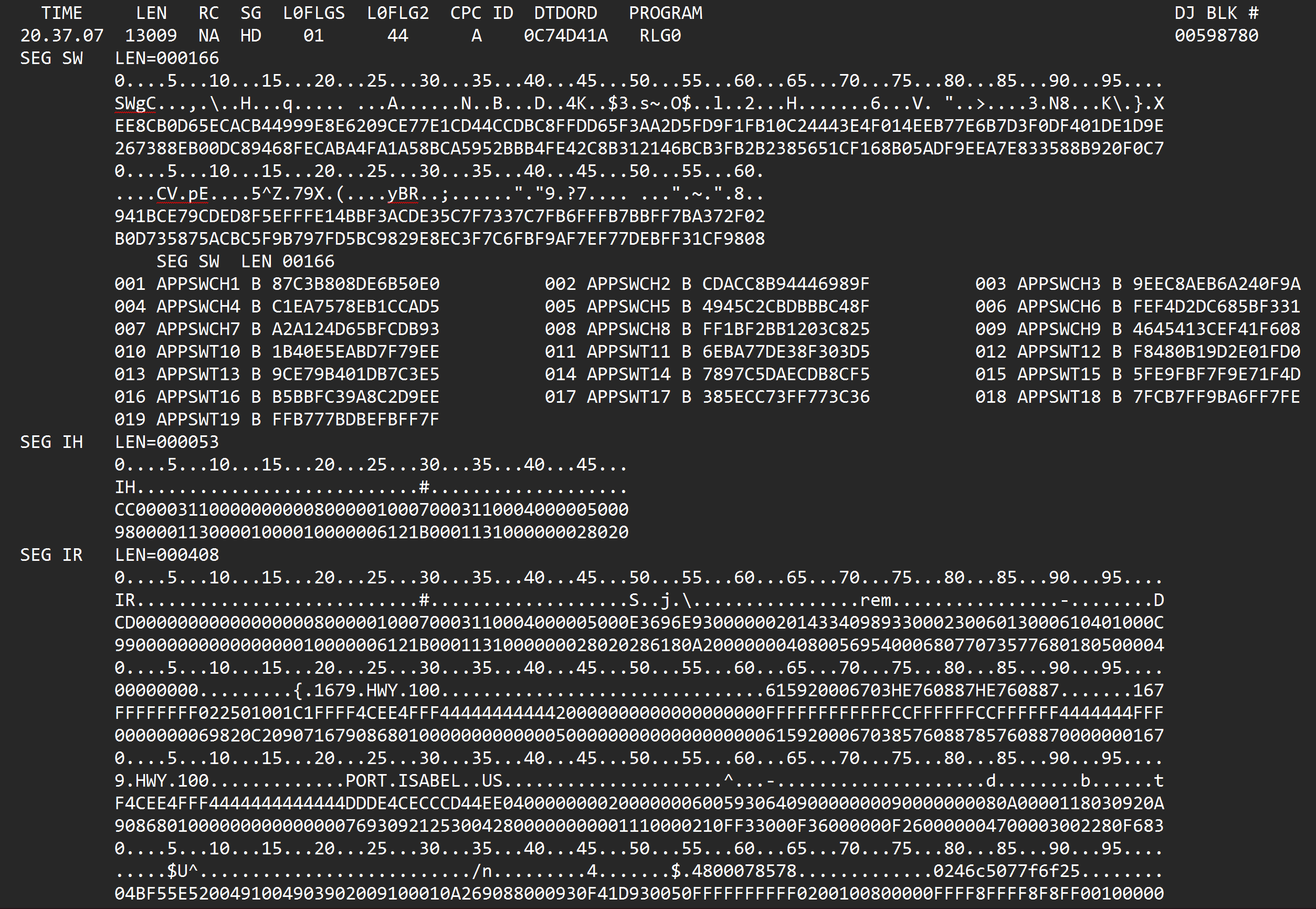
Logprints consist of different segments (SEG), hexadecimal code, and
text fields. During incidents, team members often have to pull a
logprint out from the system, analyse it, surface out anomalies and then
try to piece together what went wrong with the transaction. In such
logprints, there are important fields that often surface important
codes. An example is A0ITRS, or Field 63.4, known as the STIP
(Stand-In Processing) Reason Code field. This contains a 4 digit code
that often shows the operator why Visa had to stand in for a
transaction. In Figure 2{reference-type="ref"
reference="fig:stip"}, we can see the STIP Code is 9020, which means
that the Issuer response timer expired for this transaction.

We can see that logprints contain information that is useful to a team member, but it is hard to analyse or parse them.
Project Overview
SAGE was then conceptualised as a way to reduce the Mean Time To Resolution (MTTR) by making historical incident knowledge searchable and reusable. The idea was a Retrieval Augmented Generation (RAG) system that could answer natural language incident questions grounded in internal incident records. The project later expanded to include logprint analysis, so that team members could submit raw logprints (log outputs from the mainframe system), and get parsed transaction fields, anomaly signals, a flow diagram of the transaction path, similar historical incidents, and a grounded first diagnosis with next-step guidance to slowly escalate if needed.
Data
The data I was given consisted of 3 main sources: diary dumps, incident reports, and email threads. Information about incidents was scattered throughout these sources, and I was tasked to construct a way to query these data sources to get an authoritative report. In this section, I'll detail the data sources and the processing methods used before ingesting.
Sources
Diary Dumps
Dumps consists of data exported from the mainframe when incidents
happen. It's an internal ops/on-call diary which covers mainframe
security, and infrastructure issues. There are 31 fields, but the most
relevant are the Prob_Description and Res_Description fields, which
detail descriptions of incidents and resolutions. However, the data
fields are noisy and filled with HTML fragments, and raw mainframe data
and have to be cleaned. Below is an example of Prob_Description and
the noise it contains.
"CPSE0162E 12.22.25 IS-0001 SS-BSS SSU-BSS SE-006098 OPR-I000010
<12:22:25> BEEP
FD0104B TRC-EPC2 OWNER-ISMP ZKRIT
CP OBJ-ccnucl 0002CEB8
MsgType-System Zentry


We received a second on at 12:32:07.
We may need to reach out to the developer to get them to stop

Dump has been PP'd as well.
==== Open 2026-05-04 13:08:42(rwalters) ==="
Loading the data consists of a few steps:
Repair broken multiline CSV rows
Parse rows
Discard rows that have no information about incidents, such as rows with no incident information
Cleans problem and resolution description by removing HTML and normalising text
Extract evidence from the combined problem and resolution text to identify systems, incident references, and diagnostic codes
Convert to a searchable record with title, system, status, incident number, cleaned problem and resolution, resolution flag, and source: "diary".
Incident Reports
Incident reports are the formal ServiceNow records for production issues. They describe what happened, who owns it, its priority and state, the investigation notes, and the resolution.
I was provided with two versions of them:
incident.csvis the broad, lightweight export: about 850 records with core fields such as incident number, short description, assignment group, priority, work notes, and close notes.incident-full.jsonis the richer export: also 850 records with 200+ fields, including detailed descriptions, root cause, extra data, categories, configuration-item context, and resolution details.
Such incident reports are loaded and converted into searchable records similar to the diary dumps above.
Email Threads
Lastly, email threads cover all the emails in the shared VIP Coverage
mailbox, with about 16,554 emails in 2025 and 10,681 emails in 2026
(coverage until June). They consist of all the emails that VIP Coverage
receives, which mostly consist of incident triaging and resolutions.
However, this means that emails are inherently noisy, with email headers
such as From: and To: lines that add no value to the embedding
information.
The loader decodes the subject, extracts the plain-text email body, removes SMTP headers, and records the Incident number, recipient, and sent date. Any PAN (Primary Account Number) must be scrubbed before indexing.
Processing
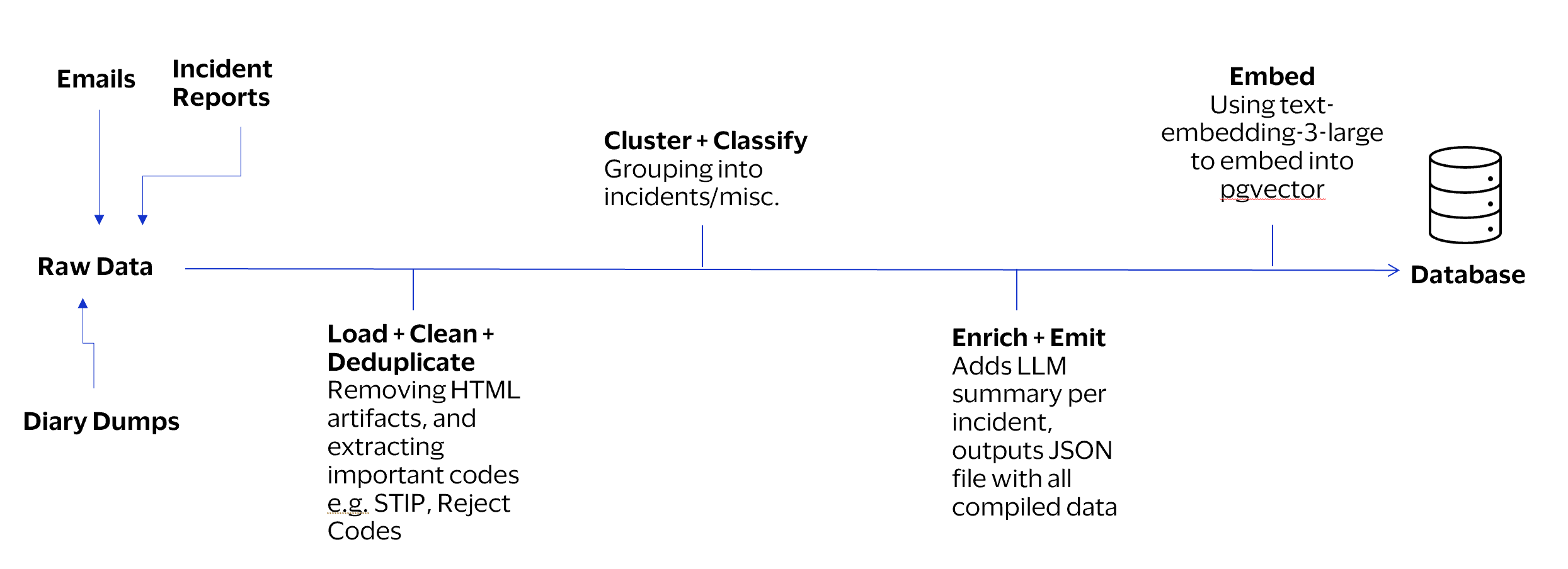
There were a few steps in processing the data, consisting of deduplicating, clustering, classification, LLM enriching, emitting intermediates, and finally embedding into a vector database.
Deduplicating
Some sources repeat incidents covered by another source. If a record contains information already covered by a more authoritative source, we drop that record.
The source priority is:
Full AskNow incident
Diary Dumps
Text-email thread
Slim AskNow CSV
Clustering
Clustering groups records that describe the same operational issue into
a single incident cluster. SAGE first uses the strongest available
identifier, in the order INC (Incident) number, CHG (Change) number,
SCTASK (Task) number, and CTASK number. Records that share an
identifier are grouped together. Within each cluster, SAGE selects a
primary record according to source priority: the full AskNow incident,
followed by the operations diary, text-email threads, and the slim
AskNow CSV export. The primary record provides the main title, status,
and opening date, while the other records are retained as supporting
evidence. SAGE combines useful details across the cluster, including
affected systems, diagnostic codes, cross-references, and resolution
information. Records without a reliable identifier are only attached
when they explicitly reference an existing incident; otherwise, they
remain separate miscellaneous records.
Classification
Due to the mixed nature of the email threads, not all data is related to incidents and may not be immediately relevant. Hence, I separate incident information from miscellaneous information. Miscellaneous records (misc): records with no reliable identifier and no cross-reference that can safely attach them to a known incident.
LLM Enriching
SAGE takes each incident cluster and improves it with structured, retrieval-friendly information. It creates a concise summary from the primary record and its supporting evidence, extracting the key issue, systems affected, diagnostic codes, likely cause, resolution, and useful lessons.
This reduces noise from raw diary dumps and long email threads. The enriched summary is then used as the preferred semantic-search text, while the original records remain available as evidence.
Emitting
After enrichment, SAGE emits the final output in the form of .jsonl
files. Incident clusters are written to the main incident dataset, with
unattached miscellaneous records written separately. This is for
inspection and so that the dataset can be transferred to other devices.
Embedding
The LLM summary is then embedded per incident. If no summary is present,
the title, systems involved, problem, and resolution are concatenated
together and embedded. Embeddings are derived from OpenAI's
text-embedding-3-large model, with 3072-dimensions. The embedding
calls are done in batches, with exponential backoff due to the Visa
GenAI API being a bit flaky. From 7950 source records initially, it
became 7098 deduplicated records, 2693 incident clusters, and eventually
2693 embeddings, which took about 14 hours to run. Embeddings are also
emitted under embeddings.jsonl.
Database
I used PostgreSQL's pgvector as the vector database of choice due to
its wide adoption and ease of use in the Visa ecosystem. I was also
consider Qdrant due to its speed but ultimately decided against it due
to the small scale of my data, where the difference in latency wouldn't
have been ultimately meaningful.
For storing in pgvector, we first insert each cleaned, deduplicated
record into the records table. This includes the record ID, source,
summary, problem and resolution text, among other fields. After that,
SAGE incrementally adds vectors and stores it in the embedding column.
Vectors are stored as HALFVEC(3072), a half-precision vector. This
uses less storage while retaining sufficient accuracy for text
similarity. After all vectors are stored, SAGE builds a HNSW
(Hierarchical Navigable Small World) index using cosine distance to
allow it to rapidly find records whose embeddings are most similar to a
user's query embeddings.
System Design
The ingestion and core logic runs on Python 3.12, relational database used is PostgreSQL, backend runs on FastAPI, frontend on Next.js, and the system is containerised using Docker Compose. The flow of SAGE consists of ingesting either a logprint or a natural language query, and outputting an answer in natural language. The following diagram describes a high-level overview of this flow.
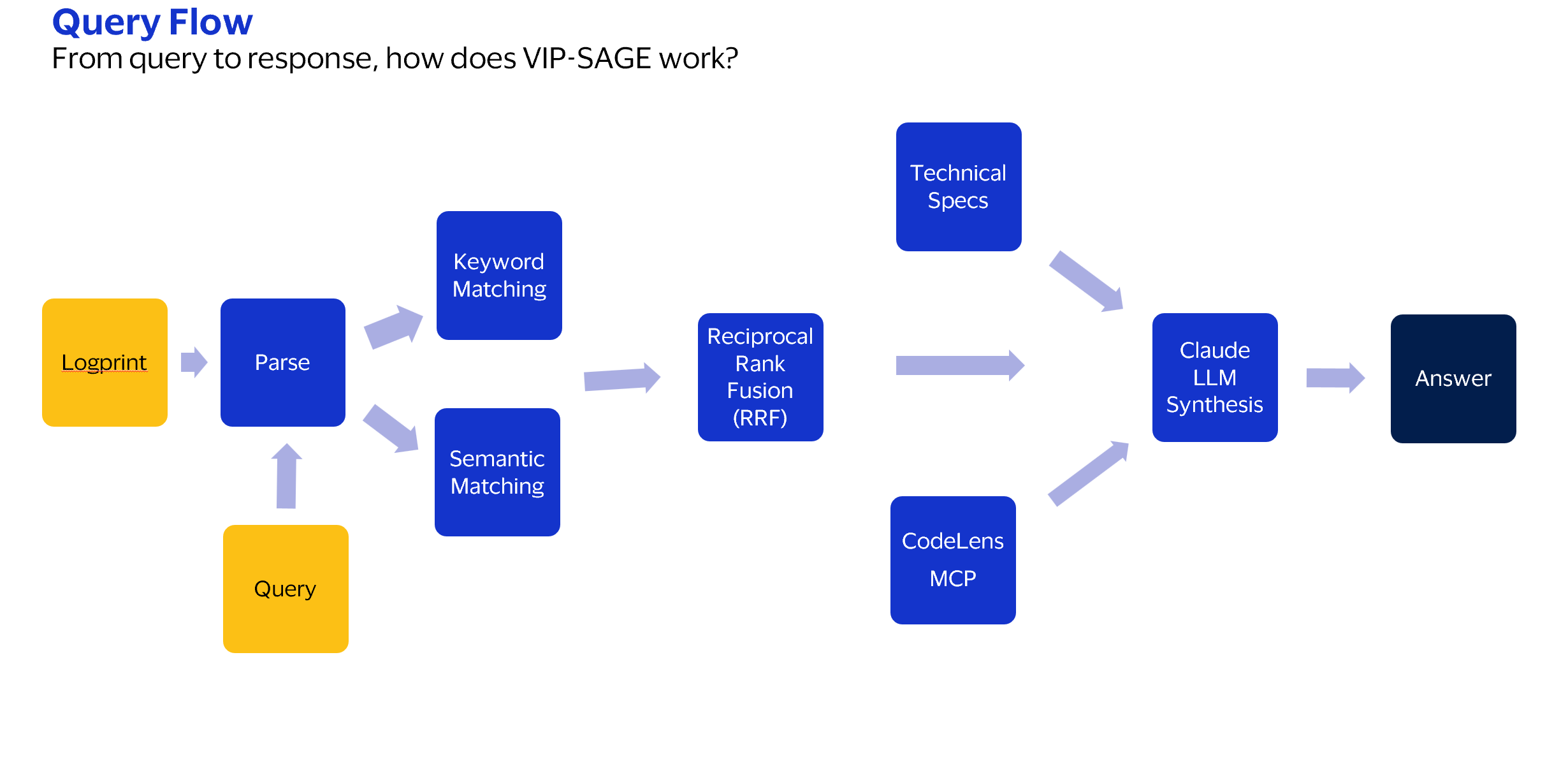
In this section, I'll elaborate on the different steps and decisions that made this system possible. SAGE uses Hybrid RAG, which means it does both keyword search (sparse retrieval) and vector search (dense retrieval). Results from both are fused together using Reciprocal Rank Fusion (RRF).
Logprint Parsing
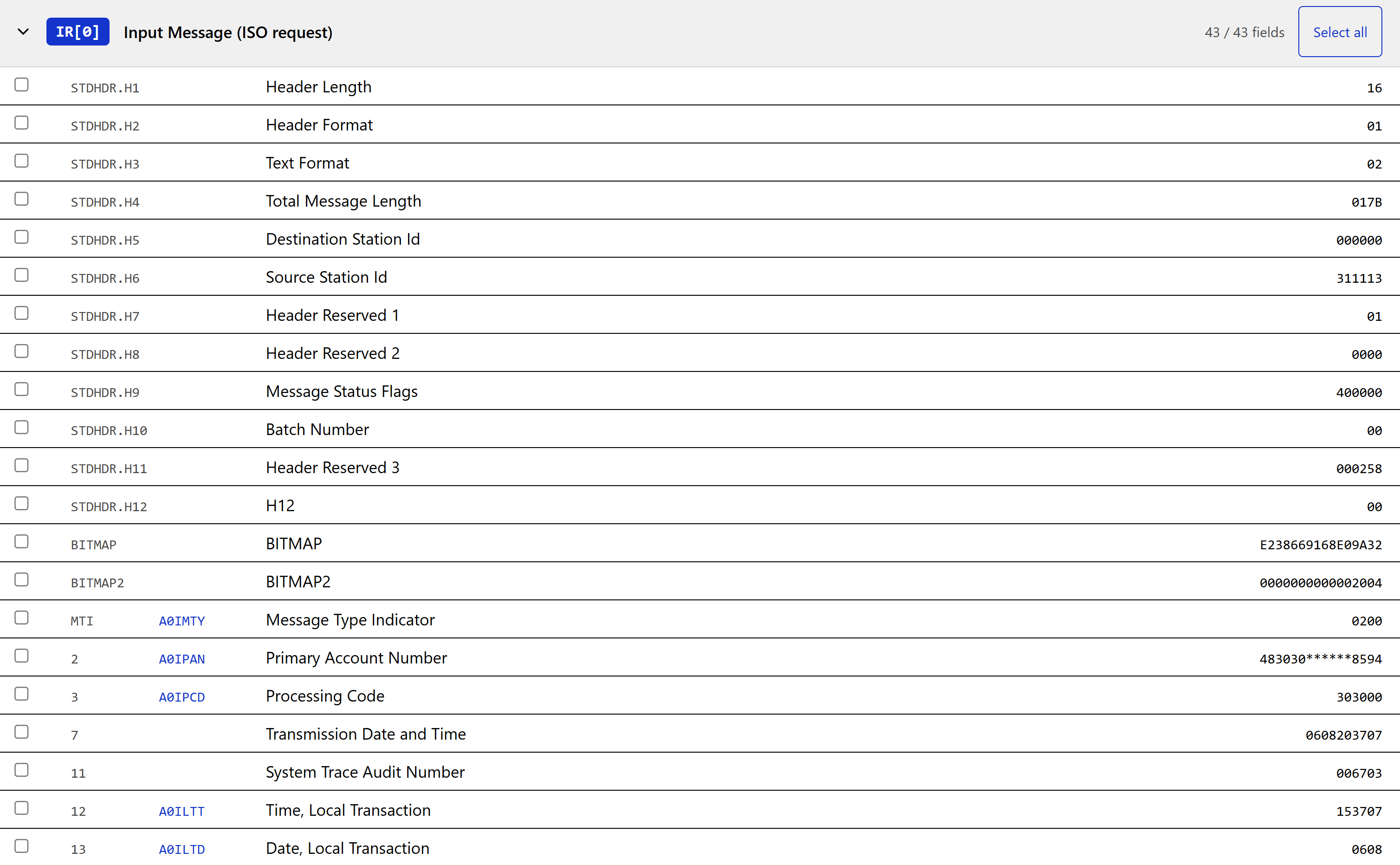
Parsing logprints was almost impossible to do manually or from scratch. Fortunately, the team already had existing solutions that they used to parse them, and I got handed an Excel sheet that nicely parses logprints into their respective fields. To integrate it into SAGE, I used Claude to reverse engineer and re-implement the parsing logic inside my app, allowing for a nice separation of fields.
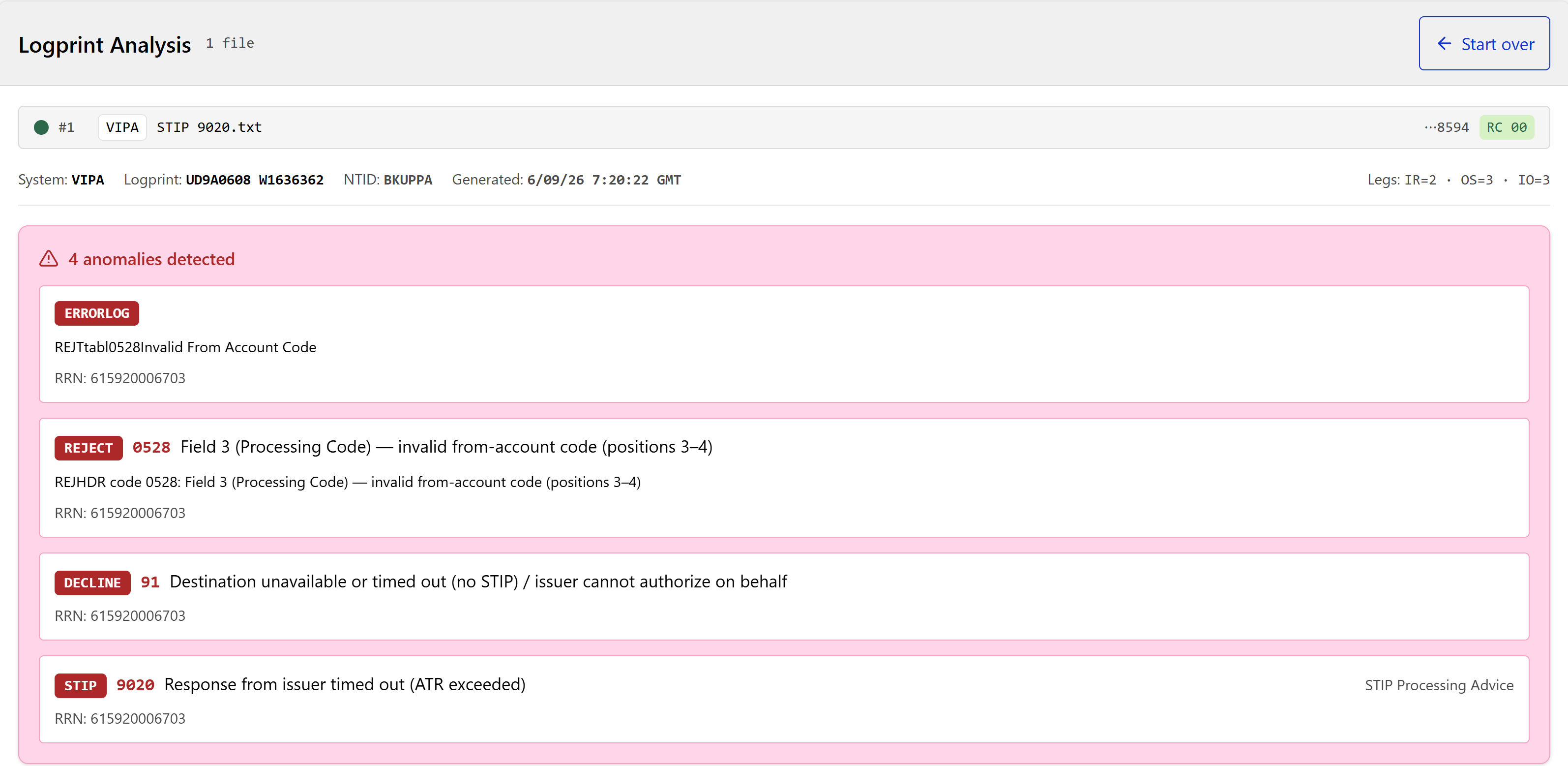
Other than parsing all the fields, when a logprint is entered, SAGE also surfaces critical fields, such as STIP reason codes, decline codes, and reject codes. These explain why a particular rejection failed, and are important in diagnosing why the overall transaction failed.
Hybrid RAG
The Retrieval Augmented Generation pipeline consists of 2 matching lists: Keyword Matching and Semantic Matching.
Keyword Matching with BM25
Keyword retrieval is performed using Okapi BM25, a ranking algorithm derived from TF--IDF (Term Frequency--Inverse Document Frequency). Okapi BM25 is a ranking algorithm used in information retrieval systems to determine how relevant a document is to a given search query. Like TF--IDF, BM25 rewards terms that occur frequently in a document but rarely across the corpus. However, BM25 also applies term-frequency saturation and document-length normalisation.
For a query $Q$ and document $D$, the BM25 score is
\begin{equation}
  \operatorname{BM25}(D,Q)
  =
  \sum_{q \in Q}
  \operatorname{IDF}(q)
  \frac{
      f(q,D)(k_1+1)
  }{
      f(q,D)
      + k_1\left(1-b+b\frac{|D|}{\operatorname{avgdl}}\right)
  },
\end{equation}
where
\begin{equation}
  \operatorname{IDF}(q)
  =
  \ln\left(
  1+
  \frac{N-n(q)+0.5}{n(q)+0.5}
  \right).
\end{equation}
Here, $f(q,D)$ is the frequency of query term $q$ in document $D$, $|D|$ is the document length, $\operatorname{avgdl}$ is the average document length, $N$ is the total number of documents, and $n(q)$ is the number of documents containing $q$. SAGE uses $k_1=1.5$ and $b=0.75$.
Each searchable document is constructed from the incident title, incident number, affected systems, problem description, and resolution. Then, BM25 retrieves the 50 highest-ranking keyword matches.
Semantic Matching with Vector Search
Semantic matching retrieves incidents based on meaning rather than exact keyword overlap.
The similarity between a query vector $\mathbf{q}$ and document vector $\mathbf{d}$ is measured using cosine similarity:
\begin{equation}
  \operatorname{cosine\_similarity}(\mathbf{q},\mathbf{d})
  =
  \frac{\mathbf{q}\cdot\mathbf{d}}
  {\lVert\mathbf{q}\rVert_2\lVert\mathbf{d}\rVert_2}.
\end{equation}
Equivalently, cosine distance is defined as
\begin{equation}
  \operatorname{cosine\_distance}(\mathbf{q},\mathbf{d})
  =
  1-\operatorname{cosine\_similarity}(\mathbf{q},\mathbf{d}).
\end{equation}
Documents with the smallest cosine distance are considered the most semantically relevant. SAGE retrieves the 50 nearest incident vectors for each query.
To avoid comparing the query against every stored vector, SAGE uses a Hierarchical Navigable Small World (HNSW) index. HNSW performs Approximate Nearest-Neighbour (ANN) search by navigating a multi-layer graph of nearby vectors. This provides substantially faster retrieval while accepting a small possibility that the exact nearest neighbour may not be returned.
Reciprocal Rank Fusion
Finally, SAGE combines the BM25 and semantic-search rankings using Reciprocal Rank Fusion (RRF). RRF uses the position of a document in each result list rather than its raw similarity score. This is useful because BM25 scores and cosine similarities are measured on different scales. By combining both sparse and dense search, we obtain a balanced search result that provides better retrieval compared to just using one technique.
For incident $D$, its fused score is calculated as
\begin{equation}
  \operatorname{RRF}(D)
  =
  \frac{1}{k+r_{\mathrm{BM25}}(D)}
  +
  \frac{1}{k+r_{\mathrm{vector}}(D)},
\end{equation}
where $r_{\mathrm{BM25}}(D)$ and $r_{\mathrm{vector}}(D)$ are the one-based ranks of incident $D$ in the BM25 and vector-search result lists. SAGE uses the standard constant $k=60$.
Both retrieval methods initially return up to 50 candidates. If an incident does not appear in one of the lists, SAGE assigns it a rank immediately below the available candidates. Consequently, an incident may still appear in the final results when it ranks highly under only one retrieval method, while incidents ranked highly by both methods receive the strongest fused scores.
After calculating the RRF scores, SAGE sorts the combined candidates in descending order and selects the eight highest-ranked incidents as context for the language model. RRF therefore combines the precision of keyword matching for exact codes and identifiers with the broader conceptual matching provided by semantic search.
Logprint Query Construction
Different queries are constructed for different paths. This section details the logprint query construction, where a logprint gets analysed. After we retrieve similar incidents, we have to build a query to the LLM. This consists of several parts --- the technical specifications, CodeLens MCP, critical fields, and the system prompt.
Technical Specifications
While historical incidents can explain how similar incidents were previously resolved, they do not provide an authoritative definition of a transaction field or processing code. The VIP system contains many niche codes that out-of-the-box LLMs are not trained to handle. Hence, the risk of hallucination is high if we do not give context for what the fields represent.
SAGE grounds the logprint analysis using extracted sections from VisaNet Authorization-Only and Full Service ATM Technical Specifications. These are long documents detailing the fields and what they mean in the context of logprints. Furthermore, SAGE also keeps reference files mapping the field headers to plaintext meanings, which will be fed into the prompt as well.
These specification files are loaded and added to the LLM's system prompt as static content blocks, marked with a "ephmeral" type for cache control. The first request will create an API-side prompt cache, while subsequent requests within the cache lifetime can reuse this same specification prefix. This reduces repeated prompt processing and saves costs on cache hits.
The trade-off here is that caching context blocks can also introduce context rot, where the LLM response quality declines as its context window gets filled up with too many tokens. In this case, I chose this method as users are unlikely to hold extended conversations with SAGE, as this prompt caching only takes effect in the logprint path, which does not allow for rolling conversation.
CodeLens MCP
CodeLens MCP is a way to retrieve evidence from the VIP source code, showing the real implementation path as additional evidence. While the main path runs, a Claude agent runs a bounded MCP tool-use investigation in the background. It requests tools such as scanning the code library or reading lines of code. This is limited to 6 tool cools and a 20-second execution budget. Evidence is appended onto the main Claude response, reducing latency impact versus the main path.
Critical Fields
The complete raw logprint and all parsed fields are not normally passed to the synthesiser. SAGE instead sends the selected metadata, detected anomalies, and supporting evidence shown in Table 3{reference-type="ref" reference="tab:claude-logprint-input"}, Appendix A.
System Prompt
The primary system prompt instructs Claude to synthesize a grounded diagnosis from parsed anomalies, retrieved incidents, specifications, and optional source evidence. It also instructs Claude to return a fixed JSON structure, which is parsed by the frontend.
Frontend
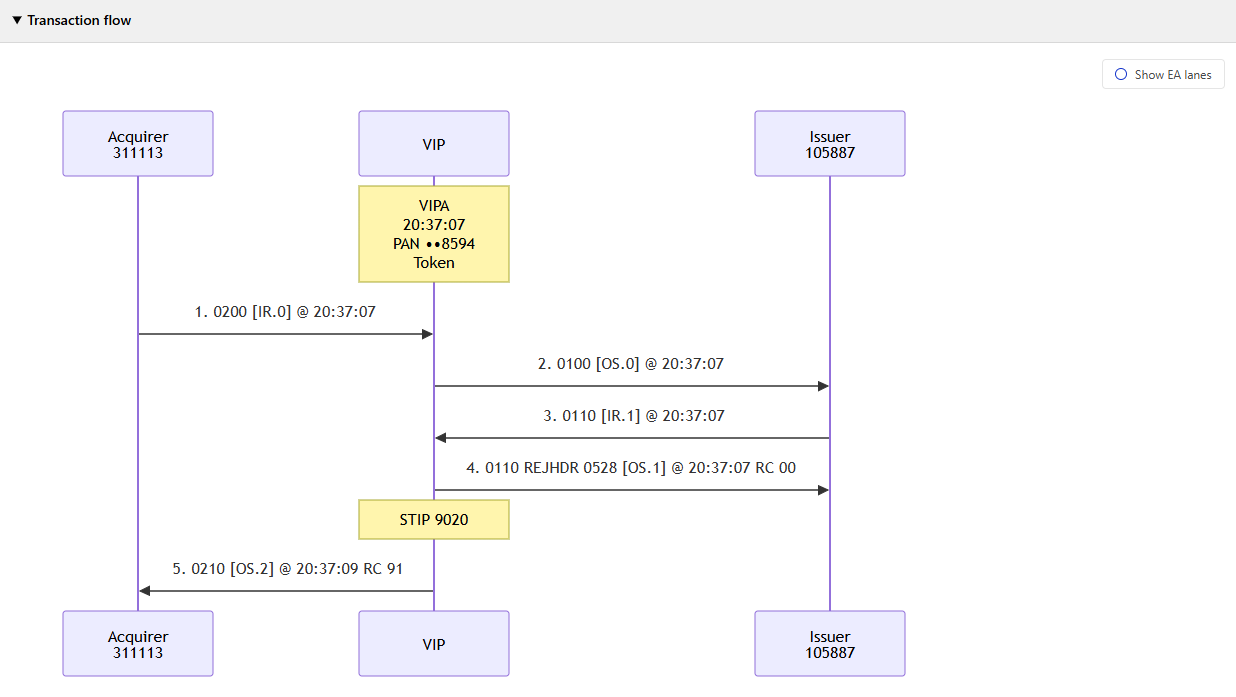
The Next.js frontend includes a flowchart that describes the transaction flow. I had a simple tab structure that allowed the user to do logprint analysis or natural language chat, as seen in Figure 5{reference-type="ref" reference="fig:chat"}
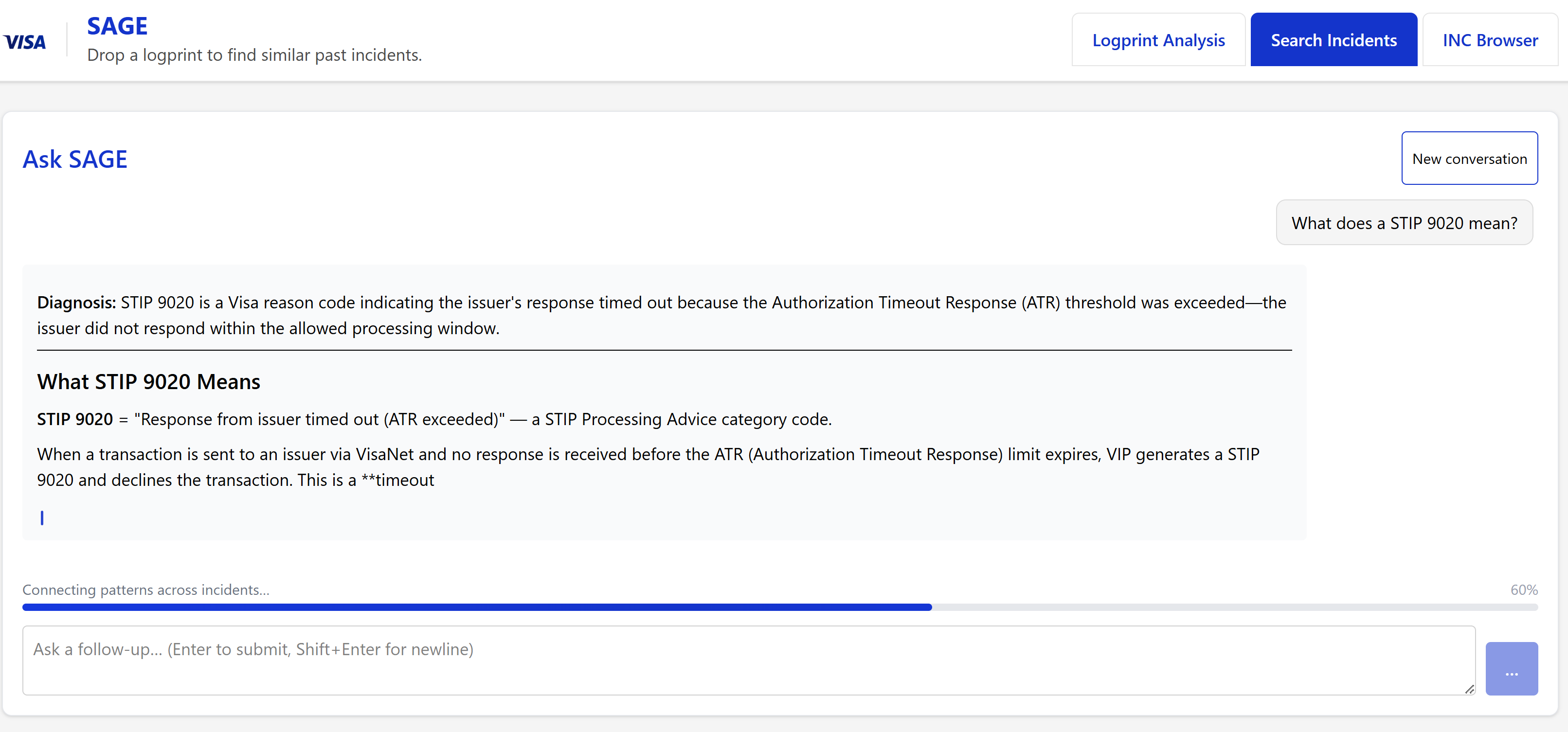
In Figure 6{reference-type="ref" reference="fig:anomalies"}, critical fields are flagged out in red so users can get a first diagnosis of the issues.
Below all the analysis, the parsed logprint fields are shown so users can see what values are present in the respective fields, as shown in Figure 7{reference-type="ref" reference="fig:parsed"}.
Based on the parsed fields and logprint timings, a flowchart is rendered to show how a transaction flows between parties. Currently, this has potential to be expanded to cover more scenarios, but it works for most authorization transactions, as shown in Figure 8{reference-type="ref" reference="fig:flowchart"}
Natural Language Chat
The Natural Language Chat consisted of a rolling conversation window. A sliding window (n=6) of prompts was preserved and used to rewrite the query for the user's next prompt. This provides the agent with enough context, while making sure that old messages that are not as relevant are deleted so as to prevent context rot for the agent.
Evaluation
The north star metric for this project is Mean Time To Resolution (MTTR), which details the average time an incident gets resolved. Based on an informal estimate by members of the VIP Coverage team, SAGE could reduce the time spent on selected investigation activities by approximately an hour per incident, through the time savings in logprint analysis, combined with natural language chat. At a current MTTR of 2.6 hours for high-priority incidents (based off internal calculations), this amounts to about 37%
On the technical side, RAG systems like SAGE get evaluated on a few metrics, retrieval quality and latency primarily. However, the main struggle with evaluating SAGE also stems from the high domain knowledge required to understand the system. Team members often have years of experience, and there are many nuances that can detail whether a particular response is accurate or not. Due to the lack of ground truth, some accuracy level metrics like Precision, Recall, and F1 Score were not chosen here.
Instead, I chose retrieval level metrics such as Mean Reciprocal Rank (MRR), Retrieval Hit Rate, and retrieval latency. To evaluate retrieval, I generated 100 question-answer pairs as a synthetic incident benchmark, following the methodology described in Hugging Face's RAG Evaluation Cookbook [@huggingface-rag-evaluation].
Overall Results (n = 100)
::: Metric Result
Evaluation questions 100 Retrieved results per query 8 Top-8 retrieval hit rate 92.0% Mean Reciprocal Rank (MRR) 0.728 Normalised Mean LLM-Judge Score 90.5% Mean answer score 4.62 / 5 Mean retrieval latency 5.61 s Median retrieval latency 3.65 s
: Results on the 100-question synthetic incident benchmark :::
The benchmark questions were synthetically generated from incidents in the SAGE corpus and evaluated using an LLM judge. Consequently, these results measure performance on an internal benchmark and should not be interpreted as independent human-validated accuracy.
Metrics Used
Mean Reciprocal Rank (MRR)
MRR measures how quickly the correct answer appears in the ranked results, higher is better. For $N$ queries, it is defined as
\begin{equation}
  \operatorname{MRR}
  =
  \frac{1}{N}
  \sum_{i=1}^{N}
  \frac{1}{r_i},
\end{equation}
where $r_i$ is the rank of the first relevant result for query $i$. A score of 1 indicates that the relevant incident is always ranked first. SAGE achieved an MRR of 0.728, indicating that relevant incidents generally appeared near the top of the retrieved results.
Retrieval Hit Rate
Retrieval hit rate measures the proportion of queries for which at least one relevant incident appears within the top $K$ retrieved results. It is defined as
\begin{equation}
  \operatorname{HitRate@K}
  =
  \frac{1}{N}
  \sum_{i=1}^{N}
  \mathbb{I}(r_i \leq K),
\end{equation}
where $N$ is the number of queries, $r_i$ is the rank of the first relevant result, and $\mathbb{I}$ is 1 when the condition is true and 0 otherwise. SAGE achieved a Hit Rate@8 of 0.920, meaning that a relevant incident appeared within the first eight results for 92 of the 100 benchmark questions.
Retrieval Latency
Retrieval latency for query $i$ is measured as the elapsed wall-clock time between receiving the query and returning the ranked results:
\begin{equation}
  L_i = t_i^{\mathrm{end}} - t_i^{\mathrm{start}}.
\end{equation}
The mean retrieval latency across $N$ queries is
\begin{equation}
  \overline{L}
  =
  \frac{1}{N}
  \sum_{i=1}^{N} L_i.
\end{equation}
SAGE achieved a mean retrieval latency of $5.61,\mathrm{s}$ and a median latency of $3.65,\mathrm{s}$. The median represents the typical query more robustly because it is less affected by unusually slow API requests.
Normalised Mean LLM-Judge Score
First, Claude Sonnet generated factoid question--answer pairs from sampled incident clusters. The generation prompt required each question to request a specific fact, resemble a realistic search query, and remain understandable without referring to the source passage.
Claude Haiku then filtered the generated pairs using three criteria: groundedness, relevance, and standalone quality. Each criterion was scored from 1 to 5, and a question was retained only when it scored at least 4 on all three criteria. This produced 100 accepted benchmark questions with corresponding reference answers.
For each accepted question, SAGE retrieved its top eight incidents and used Claude Haiku to generate an answer. A separate Claude Sonnet judge then received the original question, SAGE's generated response, and the synthetic reference answer. Its prompt asked whether the response was correct, accurate, and factual relative to the reference answer. The judge assigned an integer score according to the following rubric:
1: completely incorrect or non-factual;
2: mostly incorrect;
3: partially correct;
4: mostly correct and factual;
5: completely correct and factual.
The integer score $s_i$ was normalised to the interval $[0,1]$:
\begin{equation}
  A_i = \frac{s_i-1}{4}.
\end{equation}
Overall answer accuracy was calculated as the mean normalised score across the $N=100$ questions:
\begin{equation}
  \operatorname{Accuracy}
  =
  \frac{1}{N}
  \sum_{i=1}^{N} A_i.
\end{equation}
SAGE received a mean raw score of $4.62/5$, corresponding to a normalised LLM-judged score of $0.905$. This metric measures agreement with synthetic reference answers and should not be interpreted as independently human-validated accuracy.
Normalised Discounted Cumulative Gain (NDCG)
Discounted Cumulative Gain at rank $K$ is defined as
\begin{equation}
  \operatorname{DCG@K}
  =
  \sum_{i=1}^{K}
  \frac{2^{\operatorname{rel}_i}-1}
  {\log_2(i+1)},
\end{equation}
where $\operatorname{rel}_i$ is the relevance score of the result at rank $i$. Normalised DCG is
\begin{equation}
  \operatorname{NDCG@K}
  =
  \frac{\operatorname{DCG@K}}
  {\operatorname{IDCG@K}},
\end{equation}
where $\operatorname{IDCG@K}$ is the highest possible DCG for the same set of results. An NDCG of 1 indicates ideal ranking. This metric rewards highly relevant documents appearing earlier in results. I don't use this directly in the large eval set, but it was used to compare different methods.
Evaluating Agentic RAG
I briefly considered moving to agentic RAG as well to improve retrieval, but latency was a consideration for me. I created an agentic proof of concept with query rewriting and multiple query variants. Running my metrics on a subset (n=12) of my evaluation set, I found that agentic median latency was slower than my current system, without much noticable gain in retrieval.
::: Metric Standard Agentic
Recall@8 0.833 0.833 MRR@8 0.674 0.715 NDCG@8 0.713 0.744 Mean latency 5.63 s 7.78 s Median latency 3.26 s 7.03 s P95 latency 14.45 s 15.21 s
: Standard versus agentic retrieval on the 12-query evaluation subset :::
The agentic retriever preserved Recall@8 while improving MRR@8 and NDCG@8, indicating that it generally ranked relevant incidents more highly. However, median retrieval latency increased from $3.26$ to $7.03$ seconds because agentic retrieval performs query rewriting and searches multiple query variants. Furthermore, agentic RAG is generally more applicable in cases where the agent has to scour multiple data sources, use tools, etc. For SAGE, this was overkill as I only had one main source of data. Hence, I decided that going agentic was not worth the trade off here.
Limitations
Despite SAGE's promising evaluation results, there are a few things SAGE is limited by:
Incomplete historical data. Only around 30% of the sampled incidents contained documented resolutions. The majority of resolution paths are not formally recorded and are mostly due to operator expertise.
Data quality. Incident records, diary entries, and email threads contain inconsistent identifiers, duplicated content, operational shorthand, and occasionally conflicting explanations. Furthermore, logprints are not directly correlated with incidents, and we don't actually embed the logprints. Retrieval will not often be one-to-one due to the different nature of the data.
Retrieval mismatch. Logprints and incident reports describe different views of the same event. A logprint may contain low-level codes that are absent from the corresponding human-written incident report.
Parser coverage. The logprint parser was developed from available specifications and representative samples. Unseen message types, malformed logprints, and future format changes may be parsed incorrectly.
LLM reliability. Grounding and structured prompts reduce hallucinations but cannot eliminate them. SAGE should therefore support, rather than replace, operator judgement.
Evaluation scope. The principal benchmark used synthetic questions and an LLM judge. The results have not yet been validated through a sufficiently large human evaluation or a controlled measurement of operator mean time to resolution.
Answer Drift. SAGE has to be continuously updated to ensure that answer quality doesn't degrade and shift over time.
Deployment. SAGE is also currently fully local, due to delays in securing permissions for deployment. This is not a trivial task in a company like Visa, and will be undertaken by my team after I'm gone.
Other Internship Work
In addition to my main job, I also signed up for a Visa Intern Hackathon with 6 of my fellow interns. Over a few weeks, we prototyped and built Stead -- a way to democratize agentic commerce for everyday Singaporeans. Stead included Stead Assistant -- a multilingual payment-safety assistant for Singaporean users. The prototype mocked Telegram, intending for users to send payment requests through Telegram, evaluating scam risks with anomaly detection models, even with possible Singpass integration, and route high-risk transactions to a trusted contact for approval. On the merchant side, we also built Stead Registry -- a way to onboard merchants with Optical Character Recognition (OCR), making agent-ready menus and allowing seamless connection between consumers and merchants.
I led the team over 4 weeks, and was directly responsible for developing Stead Assistant. We managed to get into the regional finals!
Reflections
Spending 12 weeks in Visa has opened my eyes to how big companies are run, and how everything works together seamlessly. At the large transaction volume that Visa handles, any single mistake or downtime could result in millions, even billions lost in revenue. Things here move slowly and carefully, and there are many checks to ensure mistakes don't propagate to clients. Spending time developing a solution here has also made me appreciate the simple infrastructure that makes money go around the world.
As for the future of SAGE, we are planning to move the backend to a Visa-deployed solution, Fresh Agentic RAG, which unfortunately replaces my hybrid RAG solution. Next steps also include deployment on Visa internal infrastructure, Sentinel Grid, and eventual integration into the VIP Coverage team. I'm delighted to have spent my time trying to make analysis easier for the members of my team.
Ultimately, this was a great learning experience, and I'm glad to have joined Visa for these 12 weeks.
Full List of Fields Sent
::: Information Source Purpose
Information Source Purpose
VIP system Parsed logprint metadata Identifies the VIP environment on which the transaction was processed.
Logprint identifier metadata.logprint_id Provides traceability to the submitted logprint.
Segment counts Number of IR, OS and IO segments Describes the number of transaction-processing legs found in the logprint.
Transaction reference number IR Field 37, with IO Field 87 as a fallback Associates each detected anomaly with the relevant transaction.
Anomaly type Parser-generated classification Identifies whether the finding is a STIP event, decline, reject, returned transaction, error log, or XML status failure.
STIP reason code IO Field 63.4 (A0ITRS), with an RO-segment fallback Explains why VisaNet performed Stand-In Processing.
Response code OS Field 39, with IO Field 89 as a fallback Indicates the final approval or decline outcome of the transaction.
Reject code OS reject-message header (REJHDR) Identifies a message-format or field-validation rejection.
Error-log detail IO Field 702 (ERRORLGS) Provides diagnostic text produced during transaction processing.
Decoded meaning and category SAGE reference tables Supplies a human-readable interpretation of detected codes.
STIP 9020 pattern Timing and presence of STIP and reject segments Classifies the event as a timeout, unsolicited response, or invalid-format response.
RTD rule identifier IO Field 397.1 or an identifier extracted from ERRORLGS Identifies the Routing Table Decision rule associated with the transaction.
Operations command Generated from the RTD rule identifier Provides a command, such as zkrtd disp rule-<id>, for further operator investigation.
Destination PCR IO Field 509.14 (A0DPCI) Identifies the issuer-side processing centre relevant to connectivity-related STIP incidents.
Returned-message information Standard header Field H9 Identifies transaction legs that were returned because the destination was unavailable.
Security-module response Relevant DI segment for STIP 9054 Provides additional evidence for invalid Card Authentication Method cases.
XML status information Selected fields from WO and RR segments Highlights non-success status codes or invalid participation indicators.
Operator hypothesis Optional free-text input Allows the operator to provide symptoms or a suspected cause while keeping the parsed evidence authoritative.
Historical incidents Top results from BM25 and vector retrieval after RRF Provides previous incidents, causes, and resolutions that may explain the current transaction.
Technical specifications Prompt-cached VisaNet specification extracts Grounds field meanings, message types, STIP codes, response codes, and reject codes in authoritative documentation.
CodeLens evidence Read-only SLiMS MCP source-code tools Provides source-file and line-number evidence when available.
: Information supplied to the Claude logprint synthesiser :::